

When you type a message into ChatGPT, Claude, or Gemini and click send, what happens next is invisible but essential to understand. Your message is packaged into a small block of structured text and shipped over the internet to a server somewhere, owned by the company that runs the model. The server reads the message, runs the model, packages the answer into another small block of structured text, and ships it back. Your screen displays the result. The chat interface is a wrapper. The actual exchange is what is called an API call.
The same pattern is happening behind a great many other tools that practitioners use without thinking about. When a citation manager pulls metadata about a paper from CrossRef, that is an API call. When a legal research platform retrieves a docket entry from PACER, that is an API call. When a workflow automation tool moves a file from Google Drive to Box, those are API calls. When a custom RAG system retrieves a document chunk and then asks a model to summarize it, those are two API calls in sequence. Modern software is held together by API calls, and the AI ecosystem is held together by them more tightly than most.
This article explains what an API call is, what travels in the request and what comes back in the response, what authentication and rate limits and pricing actually mean, and which kinds of services that practitioners encounter are accessed this way. The goal is not to teach you how to write the code. The goal is to make the layer beneath the tools you already use legible, so that when you evaluate, commission, or build something new, you can think about it accurately.
What an API is
API stands for Application Programming Interface. The phrase is unhelpful in the abstract, so a better way to think about it is this. Every meaningful piece of software, including the services run by OpenAI, Anthropic, Google, the US government, your university library, and most cloud providers, has two ways to be used. The first is the visual interface, the website or app where a human clicks buttons and reads pages. The second is a programmatic interface, where another piece of software can ask the same service to do the same things, but through a defined set of structured exchanges instead of a visual layout.
The API is that programmatic interface. It is a published contract. The service operator says, in effect, here are the operations we offer, here is how you ask for them, here is what you have to send, and here is what you will get back. Anyone with credentials can write software that follows the contract, and the service will respond accordingly. The visual interface and the API often sit on top of the same underlying system. The website you use is, in many cases, just one client of the same API that other developers can also use.
This is why understanding APIs is useful even if you never write any code. The website is one way to use a service. The API is another. Almost any tool that integrates with a service is using its API. Almost any custom system you might commission is built on top of one or more APIs. Almost any AI workflow that does anything more than answering a single question involves at least one.
The request and the response
The basic shape of an API call is a single round trip. Your code sends a request to the server. The server processes it. The server sends back a response. Both the request and the response are blocks of structured text traveling over the internet, almost always over an encrypted connection called HTTPS.
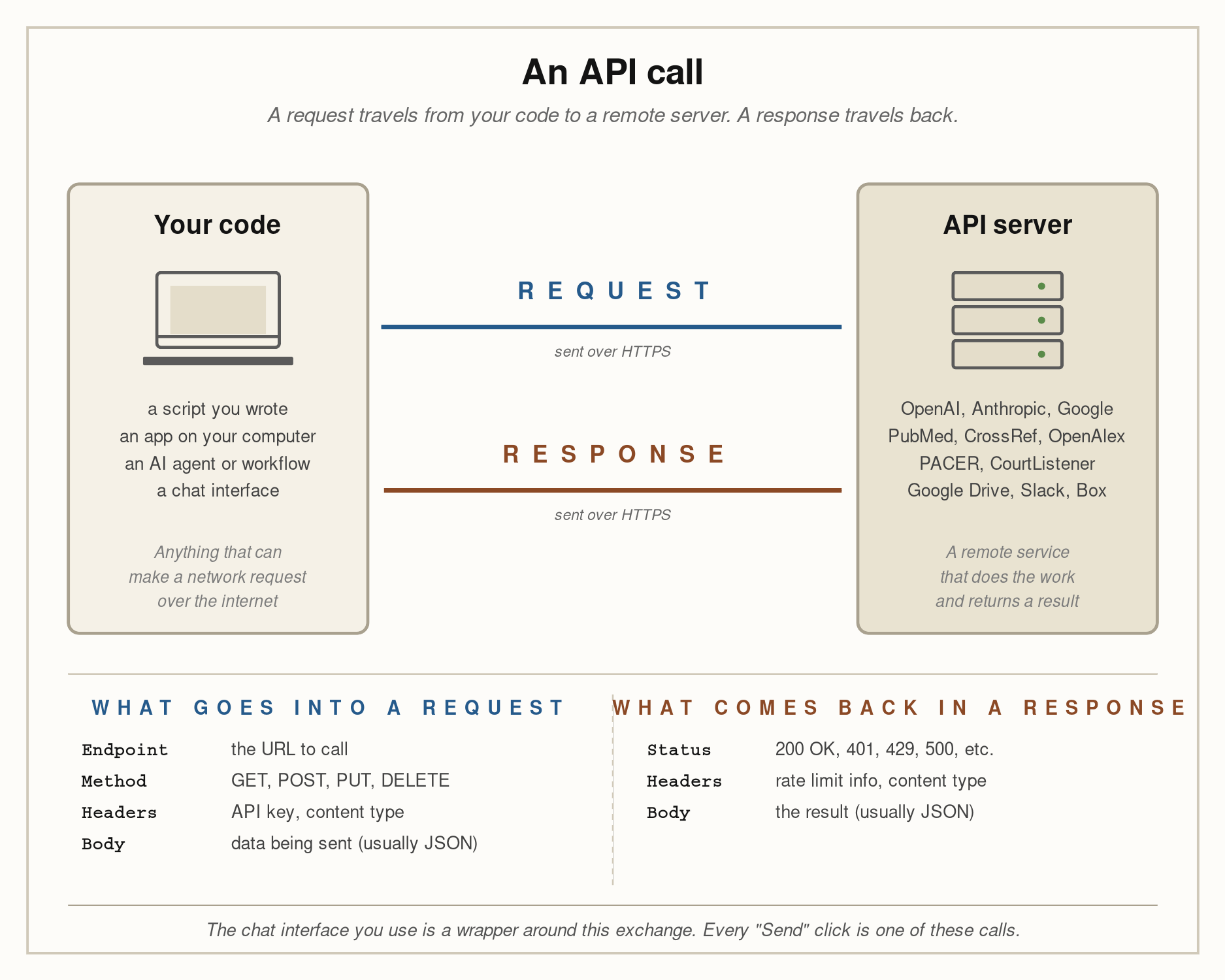
The diagram above shows the full pattern. On the left is your code. This can be a Python script you wrote, an app installed on your computer, an AI agent acting on your behalf, a workflow tool like Zapier or n8n, or even a chat interface that calls the API for you. Anything that can make a network request can act as a client. On the right is the API server. This can be OpenAI, Anthropic, Google, PubMed, CrossRef, OpenAlex, PACER, CourtListener, Google Drive, Slack, Box, or any of thousands of other services. The arrows in the middle show the two halves of the exchange: the request going out, and the response coming back.
Each half has a defined structure, summarized in the bottom panels of the diagram. A request contains four pieces of information. The endpoint is the specific URL the request is being sent to. Each operation a service offers has its own endpoint, and the URL identifies which one you are calling. The method is the type of operation, drawn from a small set of conventions: GET to retrieve, POST to send or create, PUT to update, DELETE to remove. The headers are short labeled fields that carry metadata about the request, the most important of which is the API key that proves you are authorized to make the call. The body is the actual data you are sending, almost always formatted as JSON. When you send a chat message to a language model, the message is in the body.
A response also contains a small set of components. The status code is a three-digit number that summarizes what happened: 200 means success, 401 means you are not authenticated, 429 means you have hit a rate limit, 500 means something went wrong on the server. The headers carry metadata about the response, including information about how many requests you have left in your current rate limit window. The body contains the result, again almost always formatted as JSON. When the model finishes generating its answer, the answer is in the body. Your client code reads it and does whatever it does next: displays it, saves it, passes it to another step in the workflow.
The whole exchange typically takes anywhere from a few hundred milliseconds for a simple query to several seconds for a long language model response. Multiply that across the dozens or hundreds of calls a complex workflow can make, and you start to understand why latency, retries, and error handling are real concerns in any system built on APIs.
Authentication and API keys
Almost every API requires authentication. The service has to know who you are, partly to enforce permissions and partly to bill you correctly. The dominant mechanism for non-interactive software is the API key, a long opaque string that functions as a password for your account. You generate a key in the service’s website, copy it, and store it somewhere your code can read it. Every request your code makes includes the key in one of the headers, and the server uses the key to look up which account is calling and what that account is allowed to do.
API keys are sensitive. Anyone who has the key can make requests as if they were you, including requests that cost money or that touch private data. Treat keys the way you would treat a password, and ideally a password that gives access to a credit card. Keys should never be embedded in code that gets shared or committed to a public repository. They should be stored in environment variables, in dedicated secrets managers, or in encrypted configuration files. When a key is exposed, it should be rotated, which means invalidating the old key and generating a new one.
Some services use slightly more elaborate schemes. OAuth, the authorization protocol behind login flows like “sign in with Google,” is used when a service needs to act on behalf of a specific user without holding that user’s password. Bearer tokens are short-lived credentials issued after an authentication step. Service accounts are credentials issued to non-human users for backend automation. The details vary, but the underlying logic is the same: the request has to carry proof of identity, and the server has to verify it before doing the work.
Rate limits and cost
Two practical constraints shape how APIs are used in practice. The first is the rate limit. Almost every service caps how many requests a single account can make in a given window of time, sometimes per second, sometimes per minute, sometimes per day. The cap exists to prevent abuse, to manage server load, and to enforce pricing tiers. When you exceed the cap, the server returns a 429 status code instead of doing the work, and your code has to wait and retry. Building a workflow that respects rate limits is part of building a workflow that runs reliably.
The second is cost. Most useful APIs are billed, sometimes per call, sometimes per unit of data, sometimes per token in the case of language models. The costs are individually small and aggregate quickly. A single call to a frontier language model might cost a fraction of a cent. A pipeline that processes ten thousand documents might cost tens or hundreds of dollars. A poorly designed automation that loops without a stopping condition can cost meaningfully more than that before anyone notices. Pricing pages on API services exist for a reason. Reading them before building anything that runs at scale is part of the work.
This is also one of the reasons that local, open-weight models matter. A language model running on your own computer does not require an API call at all. The request never leaves the machine, no key is needed, no rate limit applies, and no per-token billing accumulates. For sensitive data and for high-volume workflows, this can be the difference between a viable system and an unviable one. The tradeoff is that the local model is whatever model you can run on the hardware you have, which is usually smaller and slower than the frontier hosted models. Knowing where the line falls between calls that should go out to a hosted API and work that should stay local is one of the practical judgments that practitioners building AI systems have to make.
Categories of APIs that matter to practitioners
The set of services accessed through APIs is enormous, but a few categories matter directly to social work and legal practitioners. The list below is illustrative rather than exhaustive.
Language model APIs are the most familiar. OpenAI, Anthropic, Google, and the smaller providers all offer APIs that let you submit a prompt and receive a generated response. OpenRouter is an aggregator that exposes most of these models behind a single API and a single key, which is useful for development and for situations where you want to switch models without rewriting code. Every chat interface you have used is wrapping an API of this kind.
Document processing APIs convert files from one form to another. Services like Mathpix and various OCR providers convert scanned documents to text. Services like Adobe Document Services and several open-source equivalents convert PDFs to structured representations. These APIs sit at the front of any pipeline that has to ingest documents that did not start out as plain text.
Academic and research APIs are essential for any work involving the scholarly literature. PubMed offers an API to query the biomedical literature. CrossRef provides bibliographic metadata for nearly every published article with a DOI. OpenAlex offers a more comprehensive open index of scholarly works, citations, authors, and institutions. ORCID provides researcher identifiers. Semantic Scholar offers an API for paper search and citation analysis. A literature review tool that does anything more than text search is using one or more of these.
Legal and court APIs are increasingly important and unevenly available. PACER provides federal court docket and document access, with its well-known constraints on cost and ergonomics. CourtListener, run by the Free Law Project, offers a more developer-friendly API to a substantial body of federal case law and dockets. Various state court systems provide APIs of varying quality. Westlaw and Lexis offer commercial APIs for their large legal research products. The CAP (Caselaw Access Project) database from Harvard provides historical case law. Tools that automate legal research, build litigation timelines, or extract data from court records depend on these.
Government and public data APIs are a substantial and underused category. Data.gov aggregates federal datasets with API access. The Census Bureau offers extensive demographic APIs. The CDC, NIH, and HHS provide health data APIs. The Department of Health and Human Services offers various administrative data interfaces. State governments offer increasing numbers of open-data APIs for everything from licensing data to inspection records. For social work researchers and policy analysts, these are where much of the underlying data of practice actually lives.
Cloud storage and document APIs allow programmatic access to files stored in Google Drive, Microsoft OneDrive, Dropbox, Box, and similar services. These APIs are how integrations move documents into and out of cloud storage, how RAG systems ingest organizational corpora, and how automated workflows save outputs.
Communication and productivity APIs connect to the tools where work happens. Slack, Microsoft Teams, Gmail, Outlook, Google Calendar, and similar services all expose APIs. Workflow automation, AI assistants that read or send messages, and integrations of any kind use them.
Translation, geocoding, and specialized data APIs fill in specific needs. Google Translate and DeepL provide translation through APIs. Google Maps, Mapbox, and OpenStreetMap provide geocoding and routing. ClinicalTrials.gov provides trial registration data. The list extends in every direction the work extends.
The practical observation across all of these is that almost any external system you interact with for work has an API behind it. The visual interface is one front door. The API is the other.
Why this matters for AI workflows
Two implications follow from all of this for anyone building or commissioning AI systems on top of organizational work.
The first is that an AI workflow is rarely a single API call. It is a small graph of them. A typical RAG system involves at least three: an embedding call to convert the user’s question into a vector, a database call to retrieve matching document chunks (often itself an API call), and a model call to generate the final answer over the retrieved chunks. A document processing pipeline might add an OCR call, a PDF-to-Markdown call, and a metadata extraction call before any of that happens. A research synthesis tool might add a CrossRef call, an OpenAlex call, and a PubMed call. Each call has its own latency, its own cost, its own failure mode. Building a system that runs reliably means thinking about all of them, not just the model call at the end.
The second is that the format of what travels in the request and response is structured data, almost always JSON. This is why the post on plain text formats matters here, and why JSON in particular deserves its own treatment. The model does not receive your documents in their original form. It receives JSON-shaped text, prepared by whatever code you or your tool has written to package the prompt. The quality of the preparation determines the quality of the result. This is also why the conversion of source documents to clean Markdown matters: the cleaner the input, the cleaner the JSON, the better the model’s output, the more useful the response that comes back through the same arrows the diagram shows.
Where this leaves the practitioner
You do not need to write API code to be fluent in what an API is. You need to know that every external service your tools touch is being touched through an API, that every call carries an authenticated request and returns a structured response, that calls cost money and have rate limits, and that the AI ecosystem is built on this pattern from end to end. With that mental model in place, conversations about what a tool does, what data it sends out, what data it brings back, and what it costs to run become specific and grounded rather than vague.
The chat interface is the simplest version of all of this. You type a question. The interface sends an API call. The response comes back. You see the answer. Every more complex system you build or commission is the same pattern, repeated and arranged. The arrows do not change. What changes is what the arrows carry, and what the practitioner has decided to do with it.