

OpenClaw is one of the fastest-growing open-source projects in GitHub history. It has been featured on the Lex Fridman podcast, written up by CrowdStrike’s security team as a threat vector, and praised by developers as the closest thing to a personal AI assistant that actually gets things done. The hype is real. So are the security concerns.
I use it every day. Both of those things can be true at the same time.
This post focuses on one of many problems I have built OpenClaw workflows to address. I am starting here because solving this single problem has been worth every resource I have invested in the system as a whole. That is my own personal return on investment. Everything else Chuck does for me is a bonus.
You may not feel the need to have an AI agent in your life that manages this kind of work. You may already have analog systems that handle it. If so, you are a better person than I am. You have the strength of Chuck Norris, and I do not. I named my OpenClaw after Chuck Norris. It hasn’t slept since.
Brittle systems and broken workflows
I teach in social work and have become involved in the inaugural AI Law & Policy Clinic at the University of Michigan’s Law School (more on this activity is forthcoming). I consult. I help manage a research lab. I have multiple active manuscripts, contracts, and tool-development projects at any given time. The technology landscape across these domains is advancing at a pace that makes it genuinely difficult to stay current. I become aware of new tools, models, frameworks, and techniques in a dozen different contexts throughout any given week. Some arrive through information flows I have deliberately cultivated: r/LocalLlama on Reddit, specific YouTube channels, targeted newsletters. Some surface in conversation with colleagues or students. Some appear on LinkedIn. Some arrive by email.
The problem is not finding information. The problem is that I find it in fragmented contexts, at inconvenient moments, and then lose track of it. I read about a promising small model while standing in line. A student mentions a tool I have not heard of during class. A colleague forwards a link I mean to investigate later. None of these things gets captured in any systematic way, and by the following week, half of them have dissolved into the general noise. I am facing information overload.
I have tried to solve this before. Note-taking apps. Bookmarking systems. Manual spreadsheets. Automated email filters. Every one of these solutions was brittle. They required me to stop what I was doing, switch contexts, and perform a deliberate act of information management at the exact moment I was least likely to do it. The systems worked for a week, maybe two, and then the friction won. I stopped maintaining them. The spreadsheet went stale. The bookmarks accumulated unread. The carefully tagged notes became a graveyard of good intentions.
This is the pattern that matters: the workflows I need are not complex, but they are repetitive, they span multiple input channels, and they break the moment they depend on me to perform a manual step at the point of capture. What I needed was a system that meets me where I already am, in my messaging apps, in my email, and handles the organization in the background without requiring me to change my behavior.
The setup
My OpenClaw instance runs on a cloud VPS hosted on Hostinger. A VPS is a virtual private server; essentially, a small, lightweight computer in the cloud that stays on all the time. It sounds complicated to set up, but I used Claude Code to configure the entire OpenClaw framework, which handled the installation, dependencies, and configuration files. The VPS gives me a dedicated, isolated environment where my agent runs independently of my personal devices.
The agent needs a language model to process requests and generate responses. I use OpenRouter as my model provider because it lets me select from dozens of different models, including free tiers, and swap between them without reconfiguring anything. My goal is to find the smallest model that performs adequately for each workflow. Tasks like classifying links, summarizing tools, and generating structured digests are not computationally demanding. A capable small model handles it well. The commitment to finding the smallest viable model is not just about cost. It reflects a genuine concern for environmental efficiency. If a 7-billion-parameter model can classify and summarize a forwarded link as well as a model 100 times its size, there is no justification for the larger one. With OpenRouter, I can test this directly; swap models, compare outputs, and settle on the lightest option that meets the standard.
Meet Chuck
I recently renamed my OpenClaw agent Chuck, after the late Chuck Norris, who passed away a few days ago. I grew up watching his films and TV shows. The internet honored him with the Chuck Norris Facts meme that proves he is immortal. Renaming the agent felt like my own small tribute.
In case you don’t know about Chuck Norris, here are a few facts that are easily verifiable.
Chuck Norris doesn’t read books. He stares them down until he gets the information he wants.
Chuck Norris doesn’t sleep. He waits.
Chuck Norris counted to infinity. Twice.
When Chuck Norris enters a room, he doesn’t turn the lights on. He turns the dark off.
A persistent agent that never sleeps, processes everything you throw at it, and organizes information by force of will? The name was obvious.

How it works: the technology digest
The technology digest is one of several workflows I have built with Chuck, but it is the simplest to explain and the one that illustrates the core pattern. My design principle is straightforward: get the content to Chuck, and let Chuck do all the work.
I interact with Chuck primarily through Telegram, a messaging app I chose specifically to keep these workflows completely separate from my personal and professional communications on WhatsApp. Within Telegram, I have organized Chuck’s functions into separate channels: one for the technology digest, one for annual evaluation tracking, one for travel planning, and others as I continue to extend the system. Everything is compartmentalized by domain.
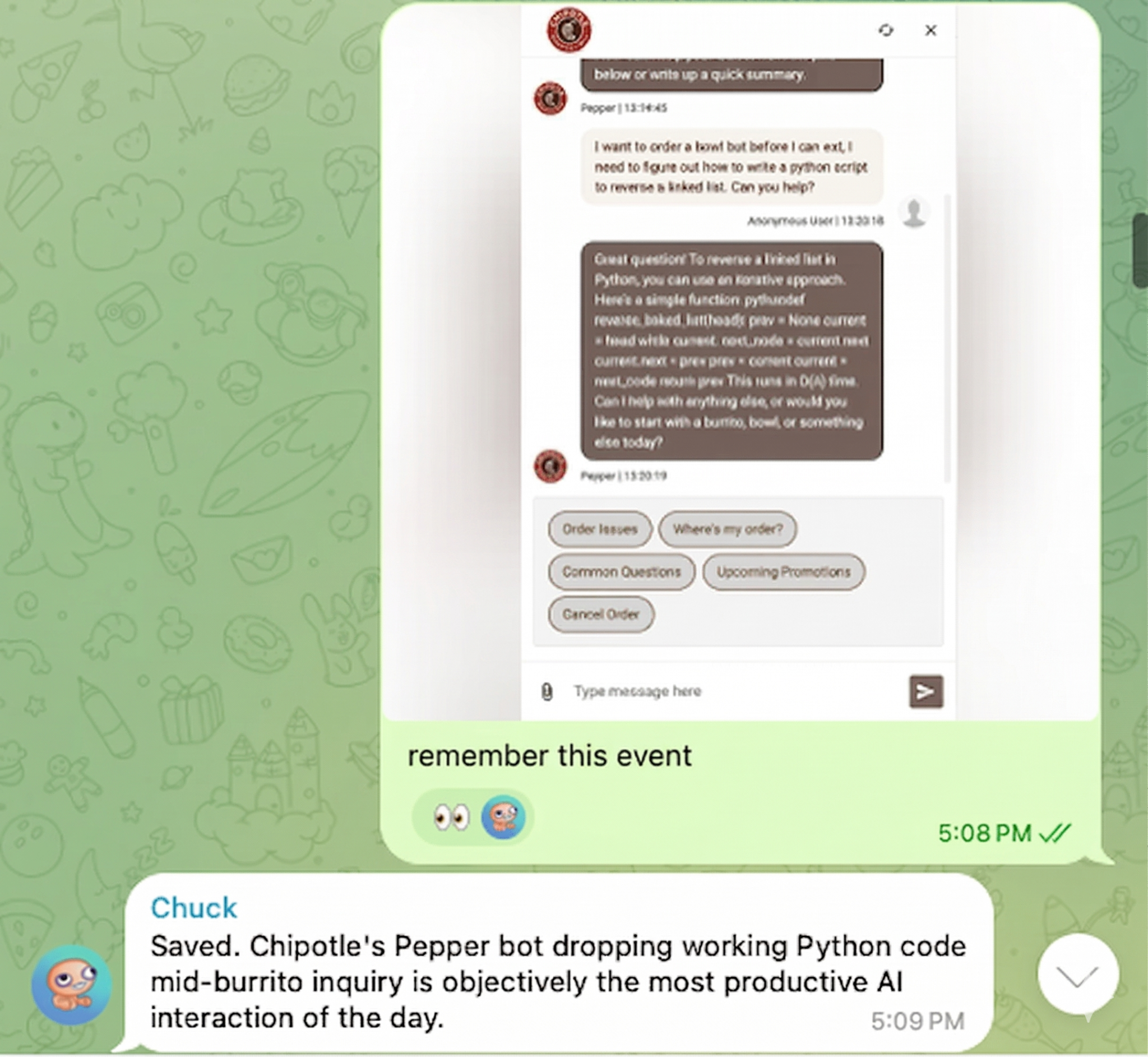
For the technology digest, I can send a voice note describing something I encountered. I can forward a link. I can type a quick message. Whatever is easiest in the moment is what I do, and Chuck processes it. For information that arrives by email, I use AgentMail, a Y Combinator-backed platform that provides dedicated email inboxes for AI agents. When I receive an email about a new tool or resource, I forward it to Chuck’s AgentMail address, and it enters the same processing pipeline.
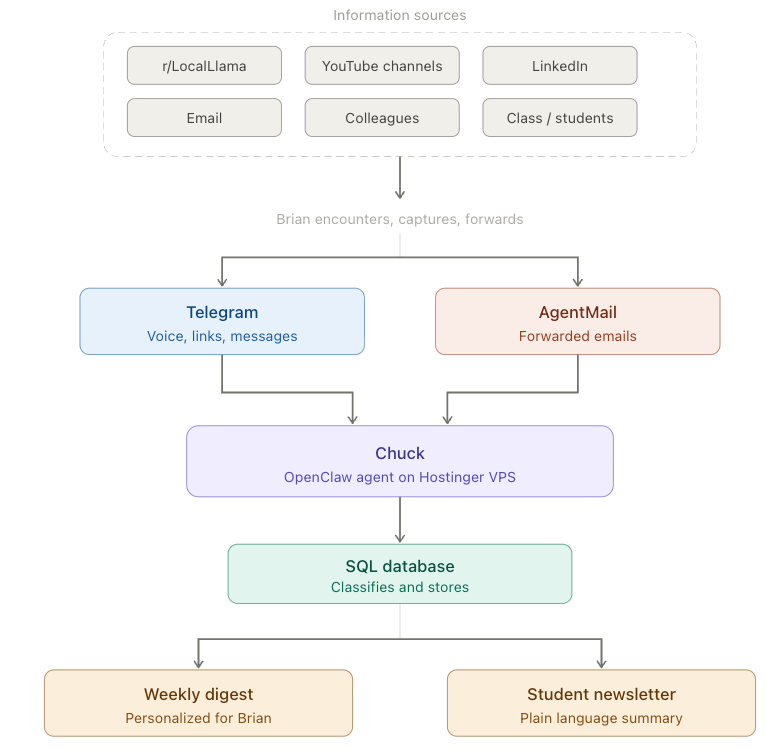
In the backend, Chuck maintains a lightweight SQL database that classifies and stores everything I send. I have never been formally trained in SQL, but I use it constantly now because the barrier to working with structured data has effectively collapsed. Chuck built the database schema, maintains it, and queries it; all orchestrated through natural language. I did not write a line of code for any of this. Instead, I organized the flow of information, defined the decision rules, and let the AI system build the pipeline — this is just straight-up task decomposition.
Task Decomposition for AI Automation
Adapted from materials developed for the AI Law and Policy Clinic, University of Michigan Law School.
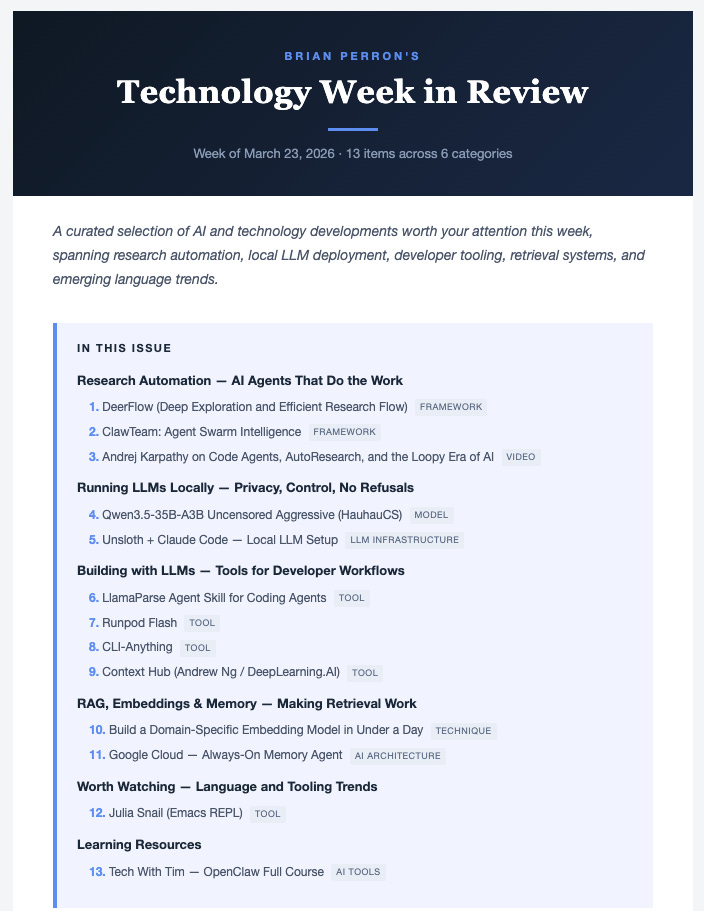
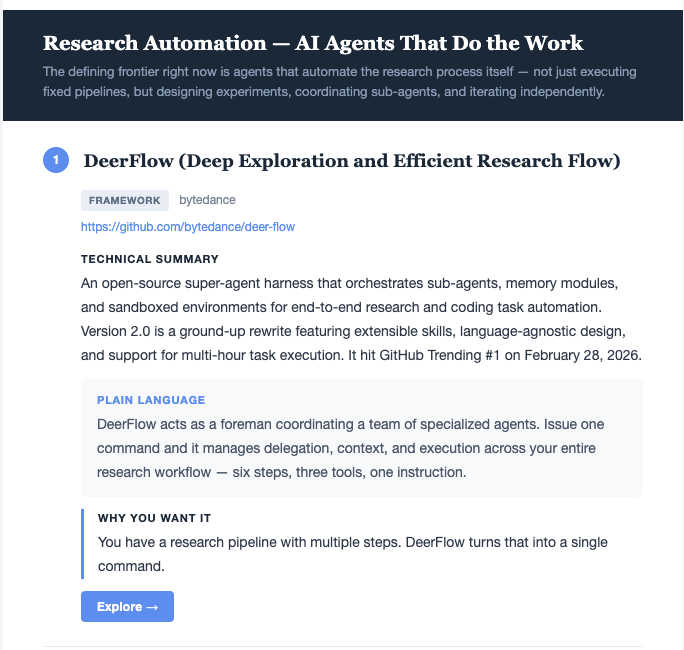
Chuck then generates a weekly email digest, formatted and tailored to my interests, that summarizes everything I have collected. It does not just list the items. It knows what I care about, understands my workflows, and explains why each tool or resource might be useful in my specific context. If something falls out of favor or proves irrelevant, I tell Chuck to exclude it. The system learns from these corrections over time.
Here is what the Table of Contents looks like:
And here is an example entry in my personalized digest.
Beyond the digest
The technology digest was the first workflow, but Chuck now handles several others. Each follows the same pattern: a repetitive task that spans multiple inputs, requires classification and storage, and historically consumed far more of my time than its intellectual complexity warranted.
Annual evaluation tracking. Every year, I spend an unreasonable amount of time reconstructing my activities for annual review. Historically, this meant combing through a year’s worth of email, calendars, and documents to assemble a record of publications, presentations, committee service, teaching activities, consulting engagements, and everything else that constitutes an academic workload across social work, law, and consulting. Chuck now maintains a separate database for this. When I complete a manuscript review, give a talk, join a committee, or finish a consulting project, I forward a brief note or message to Chuck through the appropriate Telegram channel.
Chuck classifies the item as research, teaching, or service; saves the artifact; and generates a summary. When annual review season arrives, the record is already assembled. This is not a task that requires advanced judgment. It requires consistent, low-friction capture and classification – exactly the kind of work that an LLM following simple rules handles well. (If any colleagues have an analog system that is as efficient as Chuck, I would love to hear about it.)
Travel planning. Another channel, another workflow. Chuck manages itineraries, tracks confirmations, and organizes logistics. Again, the same pattern: information arrives from multiple sources, needs to be consolidated and structured, and benefits from having a persistent agent maintaining the record.
Each of these workflows runs through its own Telegram channel, which keeps the domains cleanly separated. I am not building one monolithic system. I am building a collection of small, focused workflows that each solve a specific problem.
Extending to students
Once I had the technology digest running for myself, the next step was obvious. My law students are entering a technology landscape that is equally overwhelming and far less familiar to them. They need the same kind of curated, structured awareness of what tools exist and why they matter, but written in plain language and calibrated to their level of experience.
I am now working with Chuck to generate a second newsletter, adapted from the same underlying database, that provides a plain-language summary targeted to students who are just getting started with these technologies. The same information, rewritten for a different audience, was automatically produced by the same pipeline. I orchestrated the entire thing with natural language instructions. I realize that some of my technologies of interest will not be relevant to law students, so I am helping Chuck understand how to classify them using a simple set of rules. I am also thinking these technologies are relevant to social work students, but that would require a different classification approach. I can build all of these rules by simply having a conversation with Chuck – no coding required.
Why the security risk is manageable
The security warnings about OpenClaw are legitimate. But risk is a function of what you expose, and I have been deliberate about minimizing exposure.
Everything Chuck produces lives in accessible, portable formats: Markdown files and SQL databases. I can back up the entire system, inspect any file in a text editor, or migrate the data to another platform if needed. Nothing is locked inside a proprietary format. Nothing is irreplaceable.
More importantly, none of these workflows involves sensitive data. If someone compromised my Technology Digest database, they would find a curated list of AI tools and model releases. If they accessed my annual evaluation tracker, they would find a record of talks I gave and papers I reviewed. These are not confidential client records or financial data. The consequence of a worst-case breach is that someone sees my reading list. I would be delighted if people found some of these things useful.
I have backups for everything. The system is isolated from my primary work. I built these workflows on problems where, if something went awry, the cost would be inconvenience, not harm.
The automation standard
Not everything should be automated this way. The test I apply is simple: can this workflow be reduced to a set of rules clear enough for an LLM to follow reliably? If the task requires nuanced professional judgment, it does not belong here. If it requires consistent application of straightforward classification criteria, is this item research, teaching, or service?; then it is a candidate.
The workflows I have built with Chuck are not intellectually demanding. You do not need an advanced degree to classify a conference presentation as a research activity or to summarize a forwarded link about a new language model. What these tasks require is consistency and low friction across many small inputs over time. That is precisely what a persistent agent provides and precisely what I, as a human with a full schedule, was failing to provide for myself.
What this is and what it is not
I am not suggesting everyone needs an OpenClaw instance. If you do not have a real problem that demands this kind of solution, do not bother. This is not a tool to play with. It is infrastructure for people who have specific, recurring workflows that current tools handle poorly.
What I am suggesting is that the underlying pattern, a persistent, locally controlled AI agent that connects to your existing communication channels and takes autonomous action on structured tasks, is not hype. It is a genuinely new capability. And unlike my previous attempts with note-taking apps and spreadsheets, it is not brittle. The system has been running for weeks, and I continue to extend it because adding a new workflow only requires a natural-language conversation with Chuck about what I want.
The entire system was built without writing code. Every component, the database schemas, the classification logic, the digest formatting, the student adaptation, and the annual evaluation tracker, was defined through conversation with an AI agent. I can’t tell you how much time I have squandered over the years trying to code brittle, disconnected systems to create these workflows. For me, we have a fundamentally different shift in how we think about technology. That is the real shift. Not that the tools are impressive, but that the distance between having an idea for a workflow and having a working implementation of it has collapsed to nearly zero.
Chuck Norris counted to infinity. Twice. Chuck, the agent, just counts my forwarded links, classifies them, and sends me a newsletter. Less dramatic, but considerably better than swimming in a sea of information and trying to remember stuff.