

The most common mistake people make when working with AI on documents is assuming that the model is reading the document the way they are. A user drops a PDF into the chat interface, the model produces a useful-sounding response, and the natural conclusion is that the model opened the file and read it directly. That is not what happened. The PDF was converted, somewhere in the pipeline, into a stream of text the model could process. The conversion was invisible, the conversion was lossy, and the conversion was decided for you by whatever defaults the platform happened to apply.
For casual one-off questions, this is acceptable. For any system you are building seriously, where the same documents will be queried repeatedly, where the answers need to be reliable, or where the corpus needs to be analyzed at scale, the conversion step is too important to leave to chance. The standard practice in serious AI work is to convert source documents into Markdown once, inspect the result, fix what needs fixing, and then build the rest of the system on top of those clean Markdown files. The conversion process is its own topic and deserves a separate post. This article is about what Markdown is, why it works the way it does, and why it has become the canonical preparation format for AI work.
The argument is structural. Markdown is a plain text format that captures the logical organization of a document, headings, paragraphs, lists, tables, emphasis, and links, using a small set of punctuation conventions. The structure is encoded in the text itself, in a way that humans can read and machines can parse without ambiguity. That property, structure-as-text, is what makes Markdown the format AI systems handle most reliably. Understanding why requires looking at what Markdown actually is and what its tags are doing.
What Markdown is
Markdown is a lightweight markup language designed in 2004 by John Gruber, with substantial input from Aaron Swartz, with a single goal: to let people write text that reads naturally as plain text but can be converted into formatted output, primarily HTML, by a parser. Before Markdown, formatting plain text either meant writing raw HTML, with all of its angle brackets and closing tags, or using one of several earlier conventions for marking emphasis and structure that had grown up informally over decades of email and Usenet posts. Markdown formalized those conventions into a small, consistent grammar.
A Markdown file is a plain text file. The contents are characters. There is no hidden formatting, no embedded objects, no proprietary structure. By convention the file uses a .md or .markdown extension, but as discussed in the post on plain text, the extension is a label. The bytes inside a .md file are the same kind of bytes as in any other plain text file. What distinguishes a Markdown file is that the characters inside follow the conventions that signal structure to a reader and to a parser.
The conventions are deliberately minimal. A line that begins with one or more pound signs is a heading. A line that begins with a hyphen is a list item. Text surrounded by single asterisks is italicized. Text surrounded by double asterisks is bold. A line that begins with a greater-than sign is a blockquote. Text wrapped in backticks is treated as code. A blank line ends a paragraph. These rules can be learned in fifteen minutes and remembered indefinitely. The aesthetic principle behind the design was that the markup should be unobtrusive enough that the document remains pleasant to read in raw form, even by people who have no idea what Markdown is.
The result is a format that occupies a useful middle ground. Plain text without structure is universally readable but has no way to express headings or lists or tables in a form that downstream tools can act on. HTML expresses everything but is verbose and hostile to read in raw form. Markdown lands between the two. It looks like ordinary writing with a few small marks, and it parses cleanly into a structured document tree.
What the tags are doing
The conceptual move at the heart of Markdown is that the tags do not describe what the text should look like. They describe what the text is. A pound sign at the start of a line does not say “make this bigger and bolder.” It says “this is a top-level heading.” The visual representation, font size, weight, color, spacing, comes later, when something renders the document. Different renderers can produce different visual results from the same Markdown source. The structure stays the same.
This distinction between semantic markup and visual formatting is the central reason Markdown is useful for machine processing. A Word document or a PDF generally records visual choices. The font is twenty-four point. The text is centered. The color is dark blue. From these visual choices, a parser has to infer what the structural intent was. A line that is twenty-four point and bold and centered was probably intended to be a top-level heading, but the document does not say so directly. Visual heuristics are required, and they fail in exactly the cases where the formatting is unusual or inconsistent.
Markdown reverses the relationship. The structure is stated explicitly, and the visual representation is whatever the renderer decides. A heading is a heading because the document says so, not because of how it looks. A list item is a list item because the document says so. The text “important” inside double asterisks is bold because it has been marked as emphasized, not because someone reached for the bold button. When a parser, or a model, or any downstream tool reads the document, the structure is unambiguous. There is no inference step. The intent is in the text.
This is what people mean when they call Markdown a structured format. The structure is not an interpretation. It is a declaration.
The full set of common elements
The following elements are part of the original Markdown specification or part of the widely adopted GitHub Flavored Markdown extension. Together they cover almost everything a document needs. Each element is a tag, in the sense that it marks a region of the document as being a particular kind of thing.
Before working through the elements individually, it helps to see them in two views. The first shows the raw Markdown source, the characters as they appear in the plain text file. The second shows the rendered output, what a reader sees after the file has been processed by a Markdown parser. The same content appears in both. The difference is the representation.
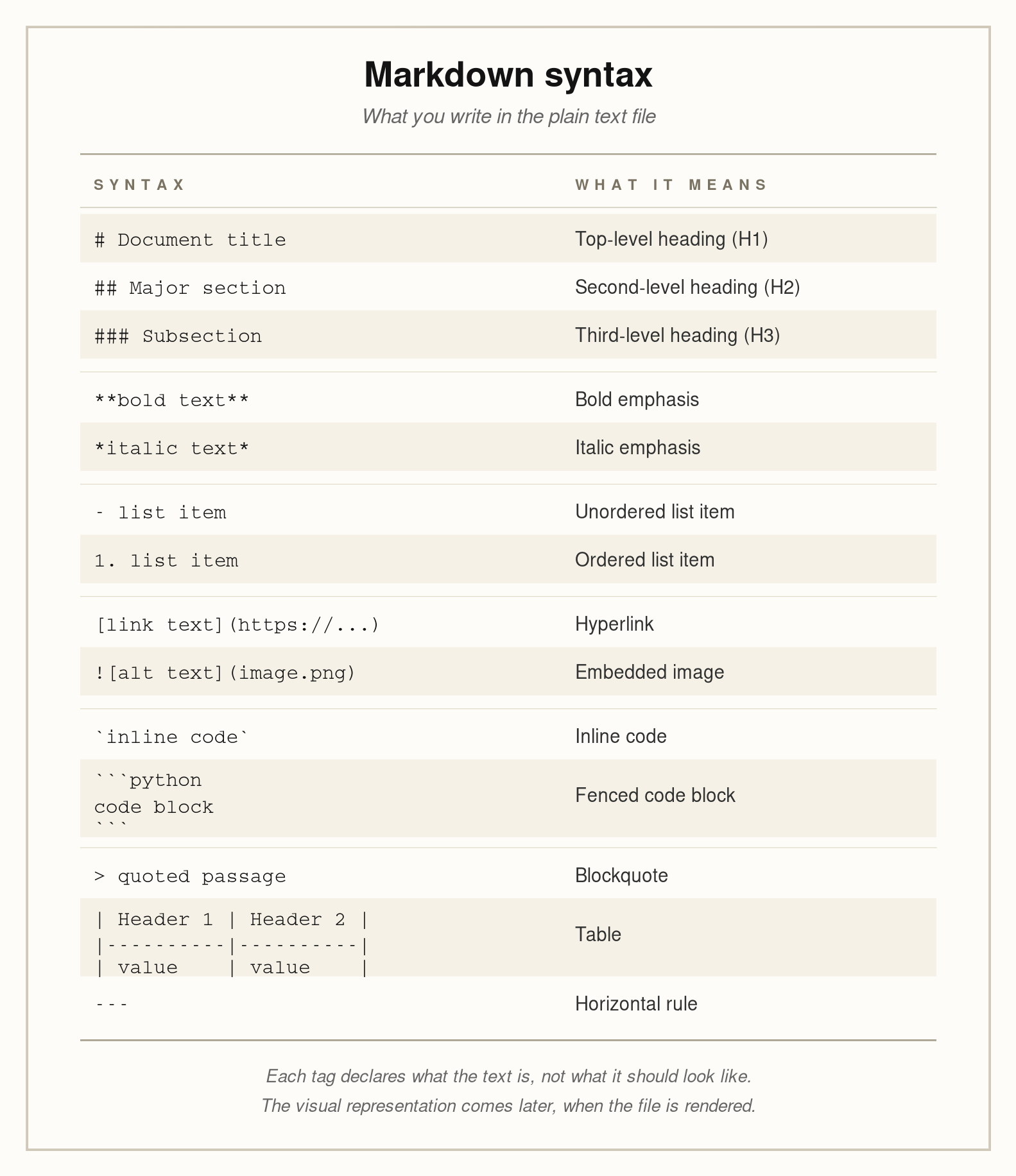
The raw view. This is what the Markdown file actually contains. Pound signs mark headings, asterisks mark emphasis, hyphens mark list items, square brackets and parentheses mark links, backticks mark code, and so on. Every character shown here is literal text in a plain text file. It can be opened in any text editor and edited by hand. There is no hidden formatting. The structure is declared by the tags themselves.
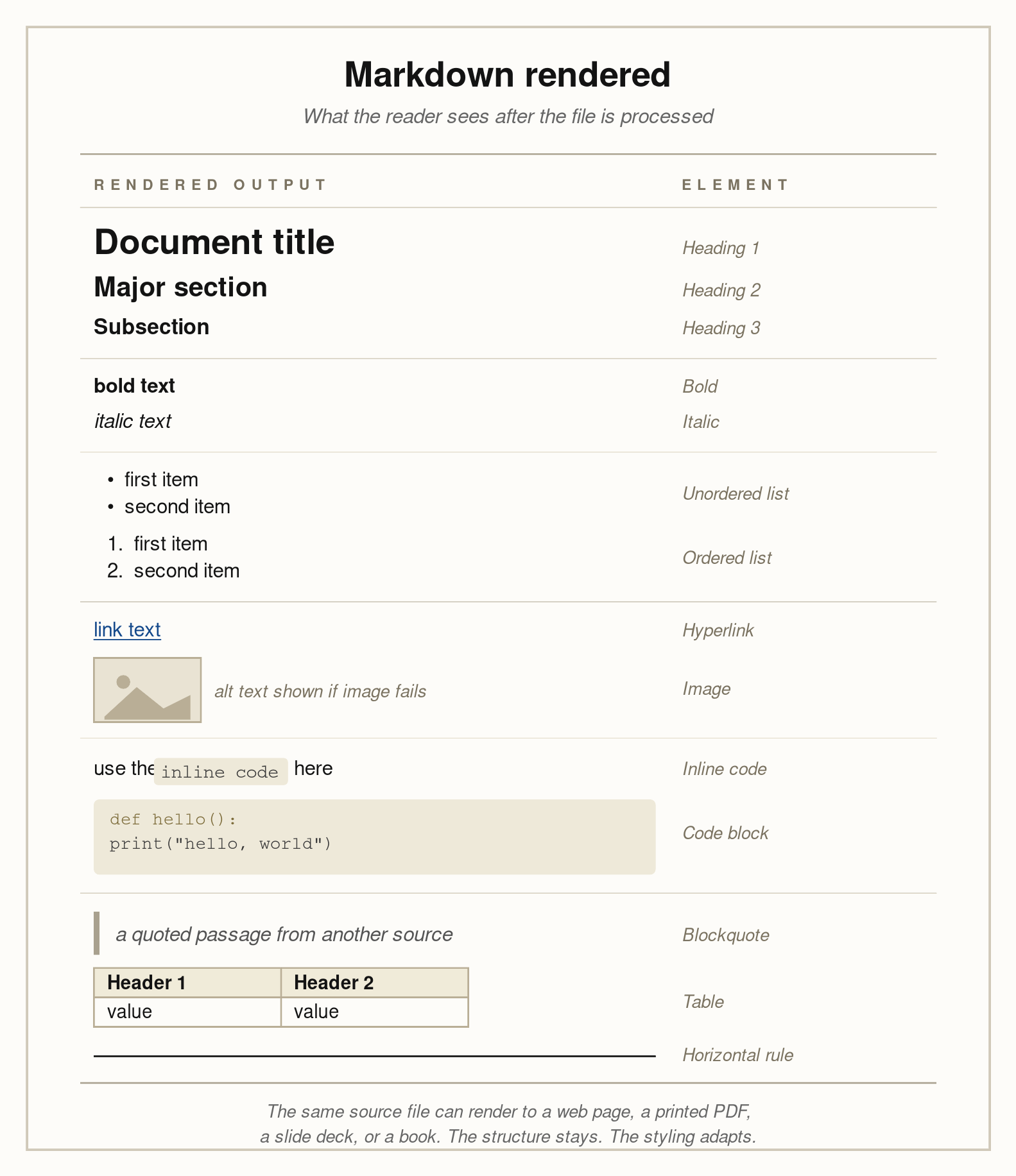
The rendered view. This is what a reader sees after a Markdown parser has processed the file and produced formatted output, typically HTML. The pound signs are gone, replaced by typographically styled headings. The asterisks are gone, replaced by bold and italic text. The hyphens are gone, replaced by bullet points. The brackets and parentheses are gone, replaced by a clickable hyperlink. None of this styling is in the source file. It is applied by the renderer at the moment of display.
The point of showing the two views together is to make the central property of Markdown visible. The structure of the document is in the source. The styling is added at render time. The same source can be rendered with different styles, by different tools, on different platforms, and the structural relationships, what is a heading, what is a list, what is a link, remain identical. This is what makes Markdown durable as a working format and reliable as an input to any system that reads documents.
With the two views in mind, the individual elements are easier to read.
Headings are lines that begin with one to six pound signs followed by a space, with the number of pound signs indicating the level. A single pound sign is the top-level heading; six pound signs is the deepest. Headings establish the hierarchical outline of the document. Almost every other structural property of a Markdown file follows from how the headings are arranged.
Paragraphs are runs of text separated by blank lines. The blank line is the entire syntax. Wrap a paragraph however you like across lines or write it as a single long line; the parser treats it as one paragraph until it sees a blank line.
Emphasis is marked with surrounding characters. Single asterisks or underscores produce italics. Double asterisks or underscores produce bold. Triple asterisks produce both. Double tildes, in the GitHub Flavored variant, produce strikethrough. Emphasis applies to the text between the markers.
Unordered lists are lines that begin with a hyphen, asterisk, or plus sign followed by a space. Each line becomes a list item. Indentation creates nested sub-lists, with the convention that two or four spaces denote a level of nesting depending on the parser.
Ordered lists are lines that begin with a number, a period, and a space. The numbers themselves do not have to be sequentially correct in the source; most parsers renumber them when rendering. This is intentional, because it allows the writer to insert or rearrange items without renumbering the whole list by hand.
Links are written as [link text](url). The square brackets contain the text the reader sees, and the parentheses contain the destination. There is also a reference style, where the bracketed text is matched to a definition placed elsewhere in the document, which keeps long URLs out of the body of the prose.
Images are written as , with the leading exclamation point distinguishing them from links. The alt text is the textual description of the image, used for accessibility and for situations where the image cannot be displayed. In Markdown files prepared for AI systems, the alt text is often the only representation of the image the model will see, which makes it more important than people sometimes realize.
Inline code is text wrapped in single backticks. It is rendered in a monospaced font and treated as literal characters, not as Markdown syntax. This is useful for referring to file names, command names, function names, or any string that should not be interpreted.
Code blocks are larger sections of code, marked with three backticks on their own line at the beginning and end. An optional language identifier after the opening backticks tells the renderer how to apply syntax highlighting. The contents of the code block are treated as literal text, even if they contain characters that would otherwise be Markdown syntax.
Blockquotes are lines that begin with a greater-than sign followed by a space. They are typically rendered with an indent and a vertical bar in the margin. Nested blockquotes use multiple greater-than signs.
Tables, in the GitHub Flavored extension, are written using vertical bars to separate columns and a row of hyphens to separate the header from the body. The visual alignment of the bars in the source does not have to be perfect; the parser handles whitespace gracefully. Tables in Markdown are limited compared to the tables in a word processor, but for tabular data they are perfectly serviceable.
Horizontal rules are produced by a line containing three or more hyphens, asterisks, or underscores. They are used to separate sections of a document where a heading is not appropriate.
Footnotes, in some Markdown variants, are written using a reference notation similar to links, with the footnote text defined separately in the document. Pandoc Markdown and several other extended dialects support footnotes; the original specification did not.
HTML passthrough is a feature of Markdown that is worth mentioning. Anywhere Markdown does not give you a way to express what you need, you can fall back to writing literal HTML, and most parsers will pass it through to the rendered output. This is an escape hatch, and it should be used sparingly, but it means that Markdown is never a strict ceiling on what the document can contain.
The complete set of elements is small. A writer can hold all of it in mind. A parser can handle all of it deterministically. A model trained on web text has seen all of it billions of times.
Why this format suits AI work
The argument for Markdown in AI workflows has several interconnected parts, and they are worth working through individually because each one matters on its own.
First, the structure is preserved through the conversion. When a PDF or a Word document is processed into plain text, the structural information, what was a heading, what was a list, what was a table, is usually lost or attenuated. The text comes out as one undifferentiated stream. A parser can sometimes reconstruct headings from font sizes, but the reconstruction is fragile. Markdown does not require reconstruction. The structure is in the text. A heading is still a heading after every step of the pipeline.
Second, the structure is queryable. Once a document is in Markdown, a script can find every section, every list, every table, every code block, every link, by looking for the corresponding markup. The same script applied to plain text would have to guess. The same script applied to a PDF would have to depend on the original parser’s interpretation of the visual layout. Markdown allows direct, deterministic access to the parts of the document.
Third, the structure aligns with how retrieval-augmented generation systems chunk documents. Almost every RAG pipeline divides a long document into smaller chunks before indexing. The naive approach is to split on a fixed character count, which produces chunks that often begin and end mid-sentence and that mix unrelated topics. A more thoughtful approach is to split on structural boundaries: at headings, at major section breaks, at paragraph boundaries when no heading is available. Markdown makes those boundaries explicit. A chunker that respects Markdown headings produces chunks that correspond to coherent sections of the document, which produces better retrieval, which produces better answers. The quality of the chunks is the quality of the system.
Fourth, language models have seen a great deal of Markdown during training. The web is saturated with it. Every README file on GitHub is Markdown. Most documentation sites are generated from Markdown. Stack Overflow posts use a Markdown variant. A large fraction of the technical writing the model encountered while training was written in this format. The result is that Markdown is, in a real sense, a format the model speaks fluently. When a model produces output, it produces Markdown by default. When a model receives input in Markdown, it parses the structure correctly and uses it. The match between input format and model expectations is part of why the format performs as well as it does.
Fifth, Markdown is diffable and versionable. Two Markdown files can be compared line by line. Changes to a single character are visible. Version control systems handle Markdown perfectly. This matters when a corpus is being maintained over time, when documents are being edited collaboratively, or when an audit trail is required. None of these properties hold for binary formats in any practical sense.
Sixth, Markdown renders to almost anything. The same source file can be converted to HTML for the web, to PDF for printing, to a Word document for distribution, to a slide deck through tools like Marp, to a static website through tools like Jekyll, Hugo, or MkDocs, to an academic paper through Pandoc or Quarto. The rendering is downstream of the source. The source remains the canonical version. This is the inverse of how most institutions handle documents, where the Word file or the PDF is treated as the master and any other version is a derivative. Treating the Markdown as the master and rendering to other formats as needed is a more durable arrangement, particularly for content that will be queried by AI systems, which will always prefer the structured source over the rendered output.
The conceptual foundation
The deepest reason Markdown is useful is that it forces a particular kind of clarity about what a document is. A document, in the structural sense, is a tree. The top is the document itself. Below the top are major sections, each marked by a top-level heading. Below each major section are subsections, each marked by a deeper heading. Below the subsections are paragraphs, lists, tables, and code blocks, the leaves of the tree where the actual content lives. The tree is what gives the document coherence. A reader navigates the tree to find what they are looking for. A model can do the same when the tree is explicit.
Many documents that exist in binary formats have lost their tree, or never had one. A PDF that consists of scanned pages has no tree at all; it is a stack of images of paper. A Word document with inconsistent heading styles has a corrupted tree, where what looks like a heading visually is just bolded body text without the heading designation. Converting these documents to Markdown forces the question of what the tree actually is. The act of producing clean Markdown is, in part, the act of reconstructing the document’s structural intent. When the conversion is done well, the result is a document whose organization is recoverable not just by the human eye but by any program that reads the file.
This is also why Markdown is the right preparation format for bespoke systems. A bespoke system, by definition, is one you have built yourself for a particular corpus and a particular purpose. The behavior of the system depends on the quality of its inputs. When you control the format of the inputs, you can be specific about what the system can rely on. You can write a chunker that splits on level-two headings because you know your documents have level-two headings. You can write a retrieval index that prioritizes section titles because you know the section titles are explicit. You can write evaluation tests that examine specific tables because you know the tables are addressable. None of this is possible when the inputs are PDFs and the conversion happens behind the scenes on every query. The work of preparing documents into Markdown is the work of giving your system something to stand on.
Where this leaves the practitioner
Markdown is a small format. You can learn the syntax in an afternoon. You can write a Markdown file in any text editor. You can read one without any tools at all. The technical surface area is intentionally minimal, which is why it has lasted for two decades and why it has spread to nearly every part of the technical ecosystem.
Its importance is out of proportion to its complexity. Markdown is the format that documentation is written in, that AI models were trained on, that retrieval systems chunk, that version control systems track, and that nearly every modern technical workflow assumes at some layer. For practitioners building AI systems on top of organizational documents, Markdown is the format the source materials should end up in before anything else is built. The conversion from PDF or Word into Markdown is its own work, with its own decisions and its own pitfalls, and that work deserves separate treatment. But the conceptual point is settled. The format that makes the rest of the pipeline tractable is Markdown, and the reason it does so is that Markdown carries the structure of a document in the text itself, where every program, every model, and every reader can see it.